For legitimate business, creative, and educational use only. Prohibited for fraudulent purposes. See our Terms of Service

Custom Gas & Fuel Receipts Online

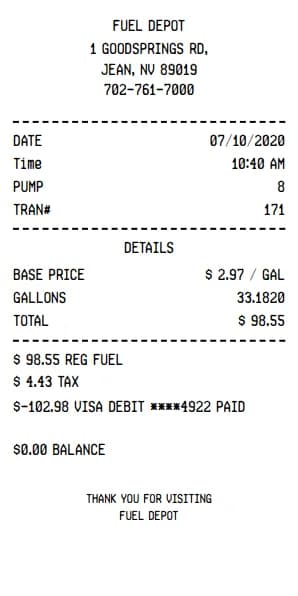
Lost your gas station receipt? Need documentation for your fuel expenses? Our gas receipt generator creates professional, detailed documentation for any fuel purchase. Whether tracking business mileage, submitting for company reimbursement, or organizing tax records, build accurate gas and fuel receipts in minutes.
Step-by-Step Guide

How to make a Gas-Fuel Receipt?

With our professional receipt maker, creating any bill is as easy as 1, 2, 3.

1. Choose a template and style

Select a Gas-Fuel receipt template, upload a logo if needed, and customize the date format and font style.

2. Add receipt details

Fill in store information, transaction details, item list, prices, taxes, payment method, and customer name. Preview all changes instantly.

3. Export your receipt

Download the Gas-Fuel receipt as a PDF, use it in email, or print it directly.

Frequently Asked Questions About Gas-Fuel Receipts

Find answers to common questions about creating and using gas-fuel receipt templates.

BuildReceipts.com is an online receipt builder that helps you create clean, professional-looking digital receipts for everyday record‑keeping. It’s designed to be simple and fast, so you can document purchases, track expenses, and keep your records organized without complicated software.
BuildReceipts.com is built for anyone who wants a quick way to create and save receipts for personal documentation—individuals, families, roommates, students, freelancers, and anyone who prefers digital records instead of paper clutter.
No. BuildReceipts.com runs in your browser, so you can create and download receipts online without installing any apps or software.
You simply enter the receipt details using the form on the website, review the preview, and then download your receipt when you’re ready. The process is designed to be straightforward, even if you’ve never used an online receipt generator before.
Yes. After you create a receipt, you can easily edit it later from your Download History. We save your receipt history so you can open any previous receipt, make changes, and download an updated copy again whenever you need.
You can access your past receipts from your Download History. This makes it easy to reopen a receipt, review it, update information if needed, and download a fresh copy without starting over.
BuildReceipts.com provides a downloadable receipt you can save and share. The available file type and download options depend on what’s shown on the download screen, and the goal is to keep it easy to store and print when needed.
Yes. Once you download your receipt, you can print it like any other saved document. Many users print receipts for personal files, reimbursements, or paperwork that requires a physical copy.
Yes. BuildReceipts.com is designed to work on modern devices, including phones and tablets, so you can create receipts whether you’re at home or on the go.
If the receipt form includes fields for tax, discounts, shipping, tips, or other charges, you can add them during creation so your receipt reflects the total accurately. What you can include depends on the fields available in the receipt builder.
Acceptance depends on the organization requesting the receipt (a store, employer, bank, warranty provider, etc.) and their specific policies. BuildReceipts.com helps you generate documentation for record‑keeping, but we can’t guarantee third‑party acceptance in every situation.
We take privacy and security seriously and aim to follow modern best practices to protect user information. For the most accurate details about data handling and retention, please review our Privacy Policy (once published) and reach out if you have questions.
If you notice an error, open the receipt from your Download History, update the details, and download an updated version. This is the fastest way to correct typos or adjust information without recreating the receipt from scratch.
Yes—using an online receipt maker for legitimate documentation and personal record‑keeping is common. BuildReceipts.com is intended for honest, lawful use only, and we do not support using the platform to misrepresent transactions or create fraudulent documents.
If you need help, have feedback, or want to report an issue, email us at [email protected] and we’ll assist you as soon as possible.